Automation · 12
Multi-Branch Patient Journey
GoHighLevel workflows that route each inquiry and booking to the right branch and follow the patient from first contact to aftercare. Every branch keeps its own pipeline, so staff see their own patients while replies, no-shows and aftercare are followed up automatically.
- Built for
- PanapaThree-branch business
- Stack
- GoHighLevel
- Workflows
- Pipelines
- Calendars
01 / 05
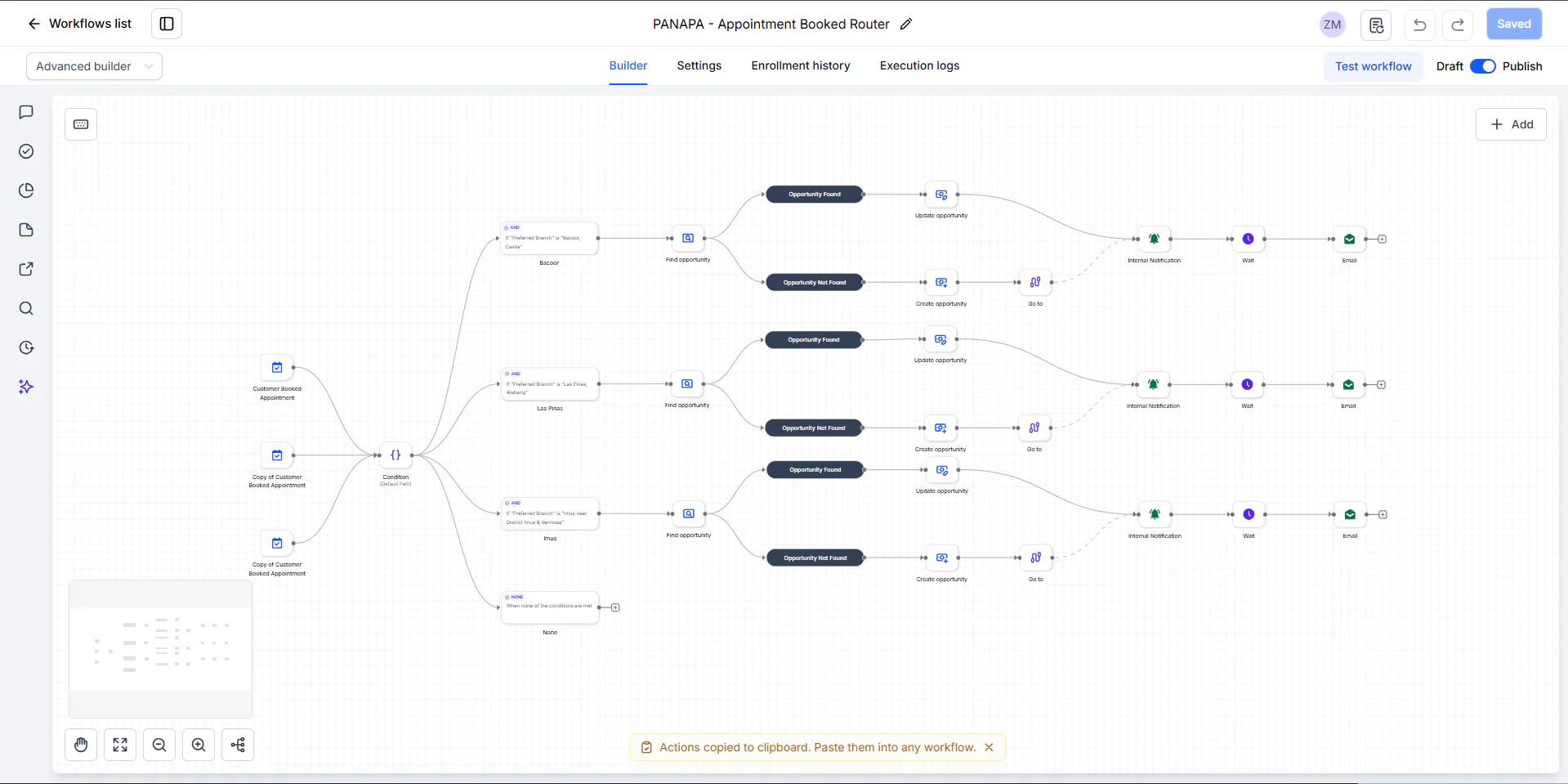
Image 1 of 5: PANAPA - Appointment Booked Router workflow in GoHighLevel
Overview
The problem. With three branches, every inquiry and booking has to land in the right branch's pipeline, and patients who go quiet, miss an appointment or finish a visit each need a different follow-up. Doing that by hand across branches is slow and easy to miss.
What I built. I built seven workflows. Two routers handle new inquiries and booked appointments: the booking router sends each booking to the preferred branch, finds or creates the patient's opportunity in that branch's pipeline, notifies the team and emails the patient. The others update contacted patients after a wait, handle replies and no-shows, run a three-email nurture for no-shows and patients who stopped replying, and send aftercare once a visit is marked successful.
Why it helps. Each branch works from its own pipeline, and every patient gets the follow-up that fits their stage without staff tracking it by hand.
System flow
4 workflows
PANAPA - Appointment Booked RouterRoutes each booking to its branch, finds or creates the opportunity, alerts the branch and emails.
- Nodes: Customer Booked Appointment ×3 (Customer Booked Appointment, Copy of Customer Booked Appointment, Copy of Customer Booked Appointment). Next: Preferred branch?.
- Bacoor, Las Piñas or Imus; anything else stops. Nodes: Condition (Bacoor, Las Pinas, Imus, None). Next: Find opportunity.
- Found or not found, per branch. Nodes: Find opportunity ×3. Next: Update opportunity, Create opportunity.
- Nodes: Update opportunity ×3. Next: Notify the branch.Then joins the found path. Nodes: Create opportunity ×3; Go to ×3. Next: Notify the branch.
- Nodes: Internal Notification ×3. Next: Wait, then email.
- Nodes: Wait ×3; Email ×3. End of flow.
Also in the account: New Inquiry Router · Customer Replied · Appointment No Show.