Systems · 04
OpsPilot Operations Dashboard
The operations dashboard and database behind OpsPilot, a lead-handling system for a B2B service business. It opens with the leads that need a person, ranked by consequence, gives every lead its own page, and lets an operator approve or reject sensitive replies and close failures. Every figure comes from the system's own record, so it shows what the automation did and what it prevented.
- Built with
- Next.js
- TypeScript
- Supabase
- PostgreSQL
- n8n
- GoHighLevel
01 / 06
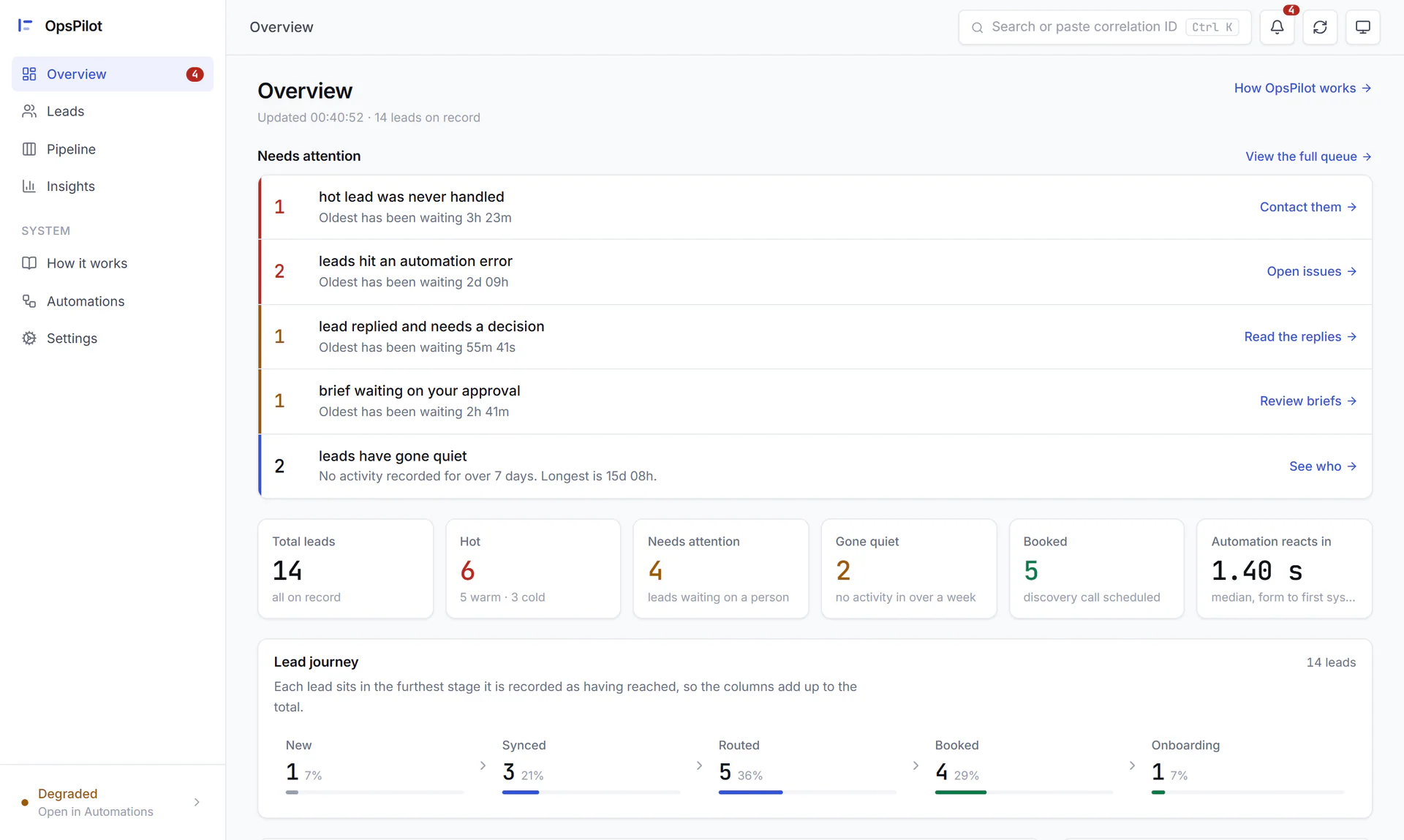
Image 1 of 6: OpsPilot overview with the needs-attention queue, headline figures and lead journey
Real dashboard, fictional demo data; the client, Northpath Systems, is a fictional case-study business.
Overview
The problem. Lead automations fail quietly: an enquiry waits unseen, a retried webhook creates a duplicate, a pricing reply goes out unapproved, or a run dies overnight. Without one place to look, an owner can't tell who needs a reply, whether the automation is working or what it actually did, and a dashboard that shows zero when it couldn't read the data only hides the problem.
What I built. The OpsPilot dashboard is where an owner or operator runs the lead process. The Overview starts with who needs attention, from a hot lead nobody handled to a reply waiting for approval. Each lead has its own page with the score, the reasons in plain English and the AI's read of the enquiry, and a How it works page explains every step next to live counts of what it has done.
Sensitive replies and implementation briefs wait in a review queue, where a person approves or rejects them and then sees what the automation actually did with that decision. Failed steps and stalled runs appear as issues that are closed with a note. Underneath, a database records every run, event, review and failure, and its own checks make sure a decision, a repeated delivery or a stuck run is handled exactly once.
Why it helps. One screen shows who needs attention, whether the automation is healthy and what it prevented, and nothing sensitive reaches a prospect without a person signing it off.
System architecture
- Browser. Works the attention queue, reads leads, decides reviews and resolves issues. Next: Password gate.CRM. Sends form, reply and booking webhooks, and receives scores, tags, messages and tasks back. Next: n8n workflows.
- Signed session cookie. One shared login, with a signed, expiring cookie checked before every page and API route. Next: Operations dashboard.
- Next.js · server-rendered. 16 pages plus route handlers to record and resend review decisions, resolve issues and search. All reads happen on the server. Next: Database, n8n workflows.
- Intake · review decision · watchdog. Process each lead, carry out review decisions once and close stuck runs, recording every step. Next: Database, Google Gemini.
- Supabase Postgres · RLS. Runs, events, idempotency keys, failures, AI decisions, reviews and lead snapshots under one correlation ID; guard functions enforce exactly-once. End of flow.Lead qualification. Reads the lead's free text as an advisor; the tested score decides. End of flow.
Key features
- Needs-attention queue ranked by consequence
- One page per lead: score, plain-English reasons, AI analysis and timeline
- Human review queue that shows what the automation then did
- Issues with their payload, closed with a required note
- Hourly stuck-run watchdog that files each stalled run once
- Health verdict with reasons, integration checks and a Safety panel
- How it works page backed by live counts
- Search by name, company or email, or trace a correlation ID
- Exactly-once guarantees enforced by database functions
- Password-gated dashboard with server-only data access
Integrations
- GoHighLevel
- n8n
- Supabase
- Google Gemini