Automation · 07
Order Consolidation & Reconciliation
An n8n workflow that brings online, branch and manual orders into one checked order list. Every order is validated before it's stored and problem orders are flagged with a reason, which removes the manual comparison work across separate sheets.
- Stack
- n8n
- Google Sheets
- n8n Data Tables
- JavaScript
01 / 02
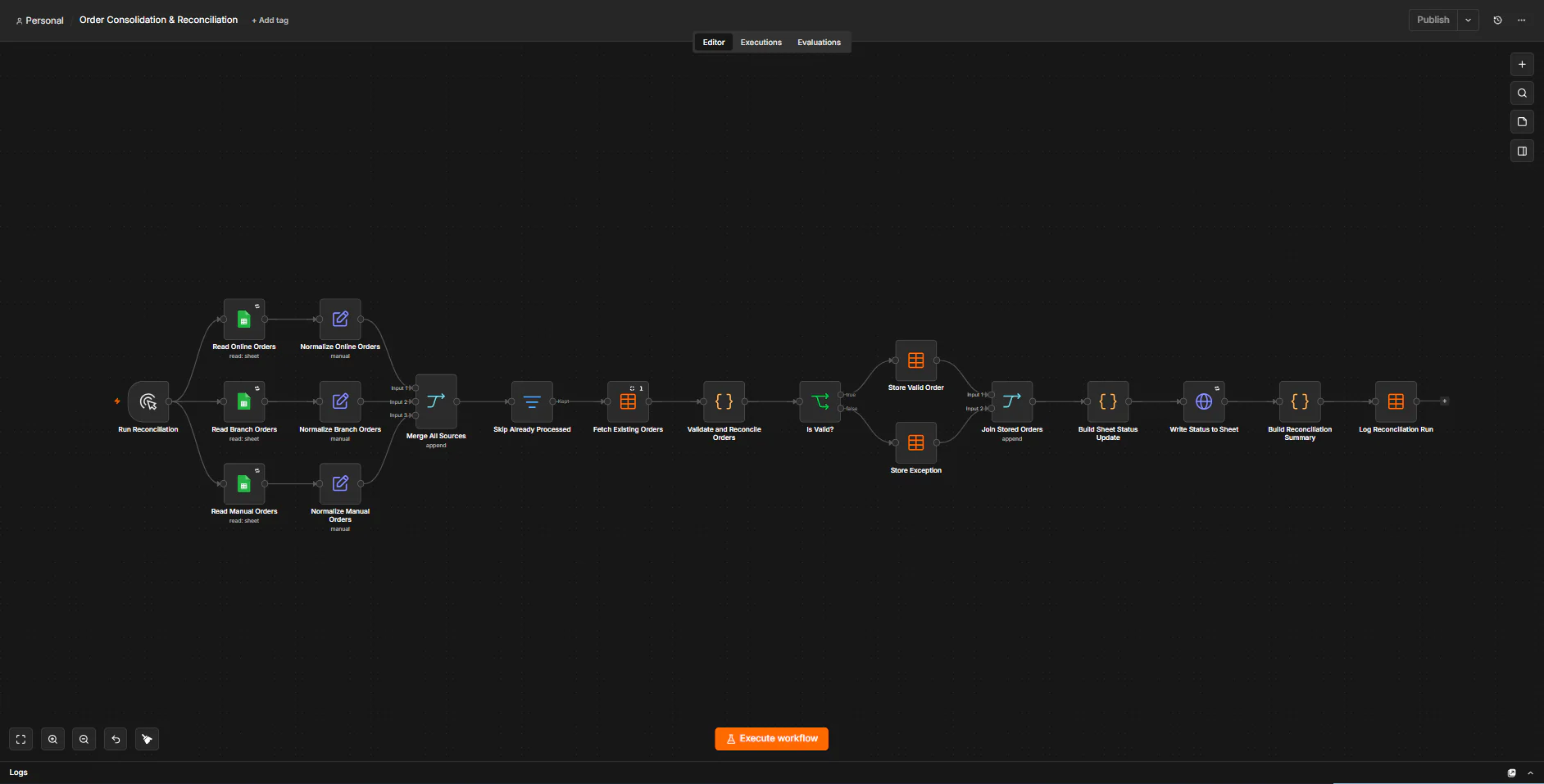
Image 1 of 2: n8n canvas of the Order Consolidation & Reconciliation workflow
The order sheet uses fictional demo data.
Overview
The problem. Online, branch and manual orders are kept in separate sheets, each in its own format. Merging them by hand leads to duplicates, wrong amounts and totals that don't add up, and it's hard to tell which rows were already processed.
What I built. I built one n8n run that reads all three Google Sheets, maps them into a common format and skips orders it has already handled. A rule-based step checks every order for duplicates, missing fields, invalid dates, wrong amounts and mismatched totals, comparing money in whole centavos. Valid orders and exceptions go to separate n8n Data Tables, the result is written back to each sheet, and every run is logged.
Why it helps. Operations works from one checked order list, and every problem order is visible in the sheet with its reason.
System flow
- Started on demand. Nodes: Manual Trigger (Run Reconciliation). Next: Online orders, Branch orders, Manual orders.
- Read from its Google Sheet and mapped to one order shape. Nodes: Google Sheets (Read Online Orders); Edit Fields (Set) (Normalize Online Orders). Next: Merge & skip processed.Read and mapped the same way. Nodes: Google Sheets (Read Branch Orders); Edit Fields (Set) (Normalize Branch Orders). Next: Merge & skip processed.Read and mapped the same way. Nodes: Google Sheets (Read Manual Orders); Edit Fields (Set) (Normalize Manual Orders). Next: Merge & skip processed.
- The three sources are merged and orders already handled are skipped. Nodes: Merge (Merge All Sources); Filter (Skip Already Processed); Data Table (Fetch Existing Orders). Next: Validate & reconcile.
- A code rule engine checks each order and compares money in integer centavos. No AI. Nodes: Code (Validate and Reconcile Orders); IF (Is Valid?). Next: Store valid order, Store exception.
- Saved to the orders_master Data Table. Nodes: Data Table (Store Valid Order). Next: Write status to sheets.Saved to the exceptions table with its reason. Nodes: Data Table (Store Exception). Next: Write status to sheets.
- Each source row gets its status through the Sheets API. Nodes: Merge (Join Stored Orders); Code (Build Sheet Status Update); HTTP Request · Google Sheets API (Write Status to Sheet). Next: Log the run.
- A run summary is saved to the run log. Nodes: Code (Build Reconciliation Summary); Data Table (Log Reconciliation Run). End of flow.