GoHighLevel · 02
Church Booking System
An internal room booking system for a church office: a custom web app that works together with GoHighLevel. Members request rooms and the office approves them. Each approval becomes a confirmed appointment in the room's GoHighLevel calendar, and contacts, custom fields and tags start the emails to members and the alerts to the office, so nobody re-enters bookings or writes follow-up emails by hand.
- Built for
- Church officeInternal room booking for members
- Stack
- GoHighLevel API
- GHL Calendars
- GHL Workflows
- Next.js
- Neon Postgres
- Google Calendar API
01 / 10
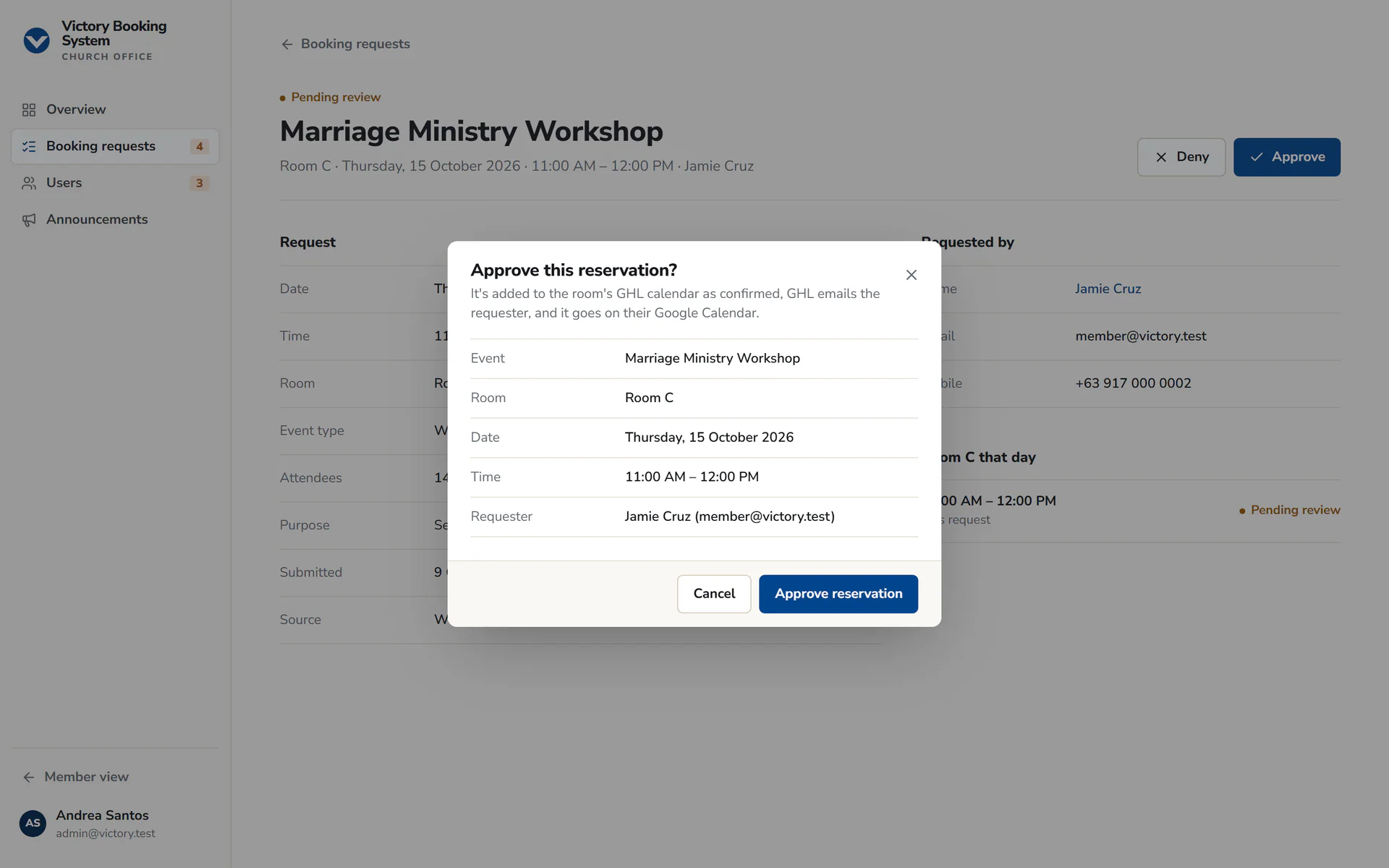
Image 1 of 10: Approve this reservation dialog: added to the room's GHL calendar, GHL emails the requester, Google Calendar event
Screenshots are from the app's demo mode with fictional people; GoHighLevel and Google are simulated there.
Overview
The problem. A church with several rooms needs every request checked against the calendar, approved or turned down by the office, recorded and followed up with the person who asked. New members also need approval before they can book. A shared calendar alone can't stop double bookings, control who may book or make sure everyone hears the outcome.
What I built. I built a custom booking app and connected it to GoHighLevel, with a clear split of jobs. The app runs the member and office experience: sign-up with office approval, choosing a room and a free time, My bookings, reschedule requests, one approval queue, admin roles and announcement posters. It also enforces the booking rules in its database, so two requests can never hold the same room and time.
GoHighLevel holds the room calendars, the contacts and the email workflows. The app reads each room calendar's free slots to show availability, adds a confirmed appointment when the office approves (which starts the approval email), moves it on a reschedule and cancels it on a cancellation. Before every other email it writes the booking details onto the member's contact and adds the tag that starts the right workflow. Google Calendar is separate: it only puts an approved booking on the member's own calendar.
Why it helps. No double bookings, a recorded decision on every request and account, and members hear the outcome by email without the office re-entering bookings or writing a single follow-up.
GHL system flow
- A member creates an account; it waits for office approval and the office is alerted. Components: Booking app (Sign-up (Neon Auth)); GHL contact (Member contact); GHL tag (booking-system-user-pending). Next: Check availability.
- Only times free in the room's GoHighLevel calendar and not already requested in the app are offered. Components: GHL calendar (Room calendar free slots); Booking database (Pending and approved requests). Next: Request.
- The request is saved as pending under the database's rules, and the office is alerted. Components: Booking database (Neon Postgres booking rules); GHL custom fields ×4 (Booking Room, Booking Event, Booking Date, Booking Time); GHL tag (room-booking-pending-review). Next: Office review.
- An admin opens the request; it's locked for two minutes so two admins can't decide it at once. Components: Booking app (Booking requests queue). Next: Approve, Deny.
- A confirmed appointment goes into the room's calendar and starts the approval email; the event goes on the member's Google Calendar. Components: GHL appointment (Confirmed, in the room calendar); GHL workflow (Room Booking - Approved); Google Calendar (Event on the member's calendar). Next: Reschedule or cancel.The denial is saved first, then the reason goes onto the contact and a tag starts the denial email; a failed email can be retried. Components: GHL custom field (Booking Denial Reason); GHL tag (room-booking-denied); GHL workflow (Room Booking - Denied). End of flow.
- A reschedule moves the same appointment and Google event; a cancellation cancels the appointment and removes the event. Components: GHL appointment (Moved or cancelled); GHL tags ×2 (room-booking-reschedule-approved, room-booking-reschedule-denied); Google Calendar (Event moved or removed). End of flow.
Booking app: the custom system (booking rules, approvals, accounts). GHL: room calendars, contacts, custom fields, tags and the email workflows. Google Calendar only receives approved bookings.
Key GHL components
- Calendars: one GoHighLevel calendar per room (five), read for free slots
- Appointments: confirmed on approval, moved on reschedule, cancelled on cancellation
- Contacts: every member, found by email then phone so one person's emails never reach another
- Custom fields: room, event, date, time and the reason for a denial or access decision
- Tags: start each workflow, removed and re-added so a repeated event still fires
- Workflows: approval, denial, account and reschedule emails to members
- Workflows: church office alerts for new accounts, bookings and reschedules
- API v2 with a private integration token, called from the server only
Integrations
- GoHighLevel API v2
- Google Calendar API
- ESV API (Verse of the Day)