GoHighLevel · 01
Multi-Branch Eye Care CRM & AI Concierge
A GoHighLevel setup for an eye care and eyewear business with three branches. Visitors can ask an AI concierge on the website, Facebook or Instagram, pick their nearest branch and book from that branch's calendar, and patients then move through a Patient Journey pipeline from first inquiry to aftercare. The team follows every stage on one dashboard and steps in when the AI hands a conversation over.
- Built for
- Panapa AntiparaEye care and eyewear, three branches
- Stack
- GoHighLevel
- AI Agents
- OpenAI
- Calendars
- Pipelines
01 / 08
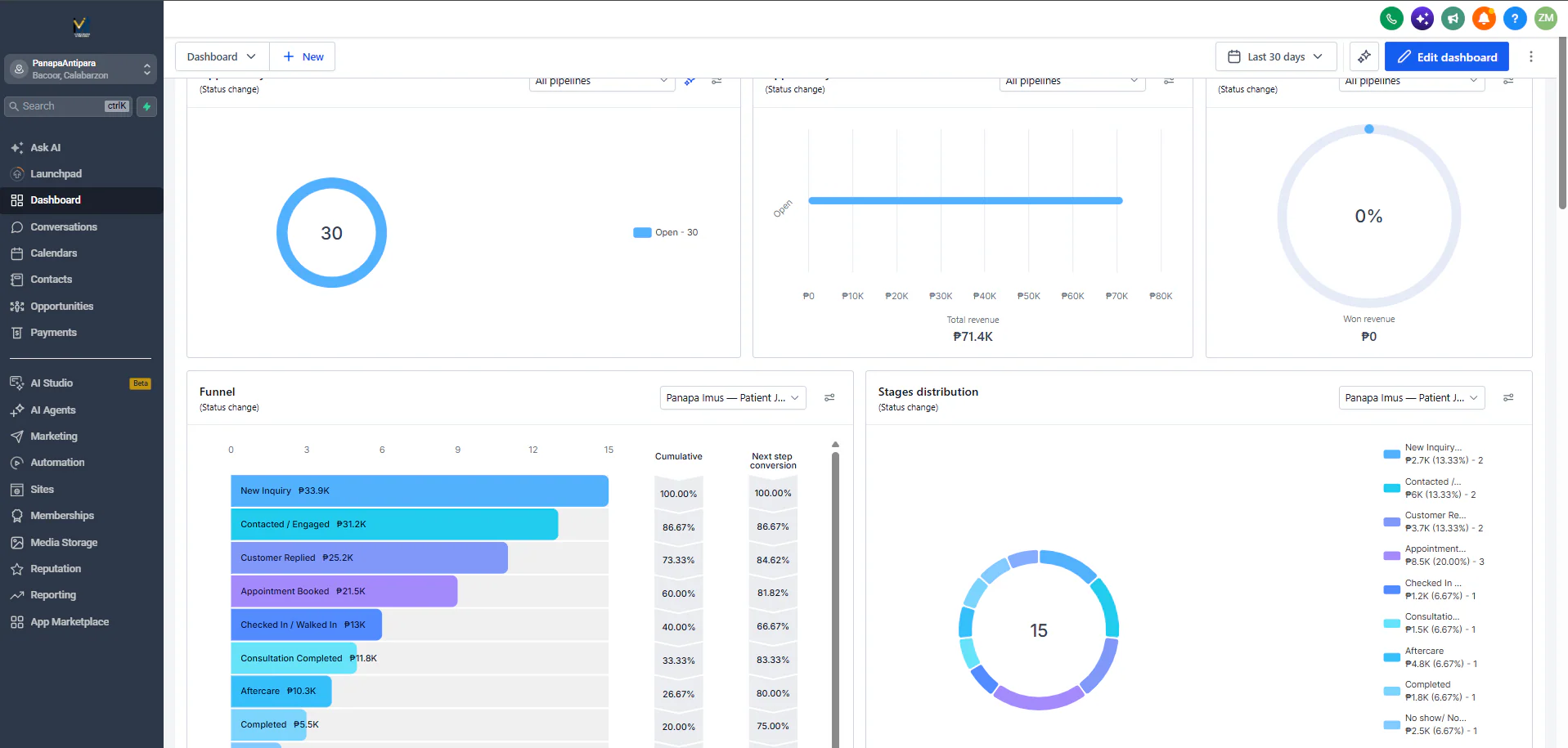
Image 1 of 8: GoHighLevel dashboard with the Patient Journey funnel and stage distribution
Overview
The problem. Patients reach the business through the website, Facebook and Instagram, and each of the three branches keeps its own schedule. Questions about services, branches and booking need quick, consistent answers, bookings have to land in the right branch, and the team needs to see where each patient is between first inquiry, visit and aftercare.
What I built. I set up the business in GoHighLevel around the patient's path. On the website, a visitor chooses Bacoor, Las Piñas or Imus and books straight into that branch's appointment calendar, or asks the website's AI concierge, which answers from Panapa's knowledge base and can offer that branch's open slots. A second AI agent answers Facebook and Instagram messages and points people to the website to book.
Both agents run on OpenAI's GPT-4.1 inside GoHighLevel and hand the conversation to a person when someone asks for one, wants to book in chat, asks about pricing or stock, or the AI can't resolve it. Each patient is tracked in a Patient Journey pipeline, from New Inquiry through Appointment Booked, Checked In, Consultation Completed and Aftercare to Completed, with a no-show stage, and a dashboard shows the funnel and how patients are spread across the stages. A custom HTML aftercare email asks how the visit went.
Why it helps. Patients get answers and a booking at the right branch without waiting for staff, and the team works from one pipeline per branch, stepping in only when a conversation needs a person.
GHL system flow
- A visitor lands on the website, messages the Facebook or Instagram page, or sends the contact form. Components: Website (Panapa Antipara site); Social channels ×2 (Facebook, Instagram); Form (Contact form (preferred branch, inquiry type, SMS consent)). Next: AI concierge answers, Choose a branch & book.
- An AI agent answers from Panapa's knowledge base in English, Filipino or Taglish and moves the visitor toward booking. Components: AI Agent ×2 (PANAPA Website AI Concierge, PANAPA Facebook n Instagram AI); Knowledge base (PANAPA fb n ig ai); Model (OpenAI GPT 4.1). Next: Choose a branch & book, Human handover.
- Pricing or availability questions, chat bookings, missing information, unresolved issues or a request for a person go to the team. Components: Website concierge handovers ×4 (Human Requested, Failed to resolve issue, Pricing Availability Special Assistance, Lack of information); Facebook & Instagram handovers ×5 (Pricing Product Availability, Failed to resolve issue, Customer Wants Chat Booking, Lack of information, Human Requested). End of flow.The visitor picks Bacoor, Las Piñas or Imus and books in that branch's appointment calendar, on the site or through the concierge. Components: Calendar ×3 (Bacoor, Las Piñas, Imus); AI action (Appointment Booking). Next: Patient Journey pipeline.
- Each patient moves through the pipeline from New Inquiry to Completed, with a no-show stage for missed visits. Components: Pipeline stages ×9 (New Inquiry, Contacted / Engaged, Customer Replied, Appointment Booked, Checked In / Walked In, Consultation Completed, Aftercare, Completed, No show). Next: Aftercare email, Dashboard.
- After the visit, a custom HTML email thanks the patient and asks how it went. Components: Email template (Aftercare / Feedback Request). End of flow.The team sees open opportunities, total and won revenue, the stage funnel with conversion, and how patients are spread across the stages. Components: Dashboard widgets ×5 (Open opportunities, Total revenue, Won revenue, Funnel, Stages distribution). End of flow.
The routing, follow-up and aftercare workflows behind these stages are on the Automation page (Multi-Branch Patient Journey).
Key GHL components
- AI Agents: a Website AI Concierge and a Facebook & Instagram assistant, on OpenAI GPT-4.1
- Knowledge base: the agents answer from Panapa's connected knowledge base
- Human Handover actions: chat bookings, pricing and availability, missing information, unresolved issues, human requested
- Calendars: one appointment calendar per branch (Bacoor, Las Piñas, Imus)
- Appointment Booking action: the concierge offers a branch's open slots
- Forms: contact form with preferred branch, inquiry type and SMS consent
- Pipelines: a Patient Journey pipeline, nine stages from New Inquiry to Completed plus No show
- Dashboard: open opportunities, total and won revenue, stage funnel and distribution
- Email template: custom HTML aftercare and feedback request
- Workflows: routing, follow-up and aftercare (Automation: Multi-Branch Patient Journey)